Model Context Protocol
Connect EbbChart to Claude
Ask Claude about your audiogram readings, symptom logs and medication history — using the data you've already collected in EbbChart.
These are the only two values you need.
Setting up in Claude.ai
- Enable access in EbbChart first. Open the EbbChart app, go to Profile → Connected AI assistants, and turn it on. The connector returns an error until you do — this step can't be done after.
- Open claude.ai and go to Settings → Connectors → Add custom connector.
-
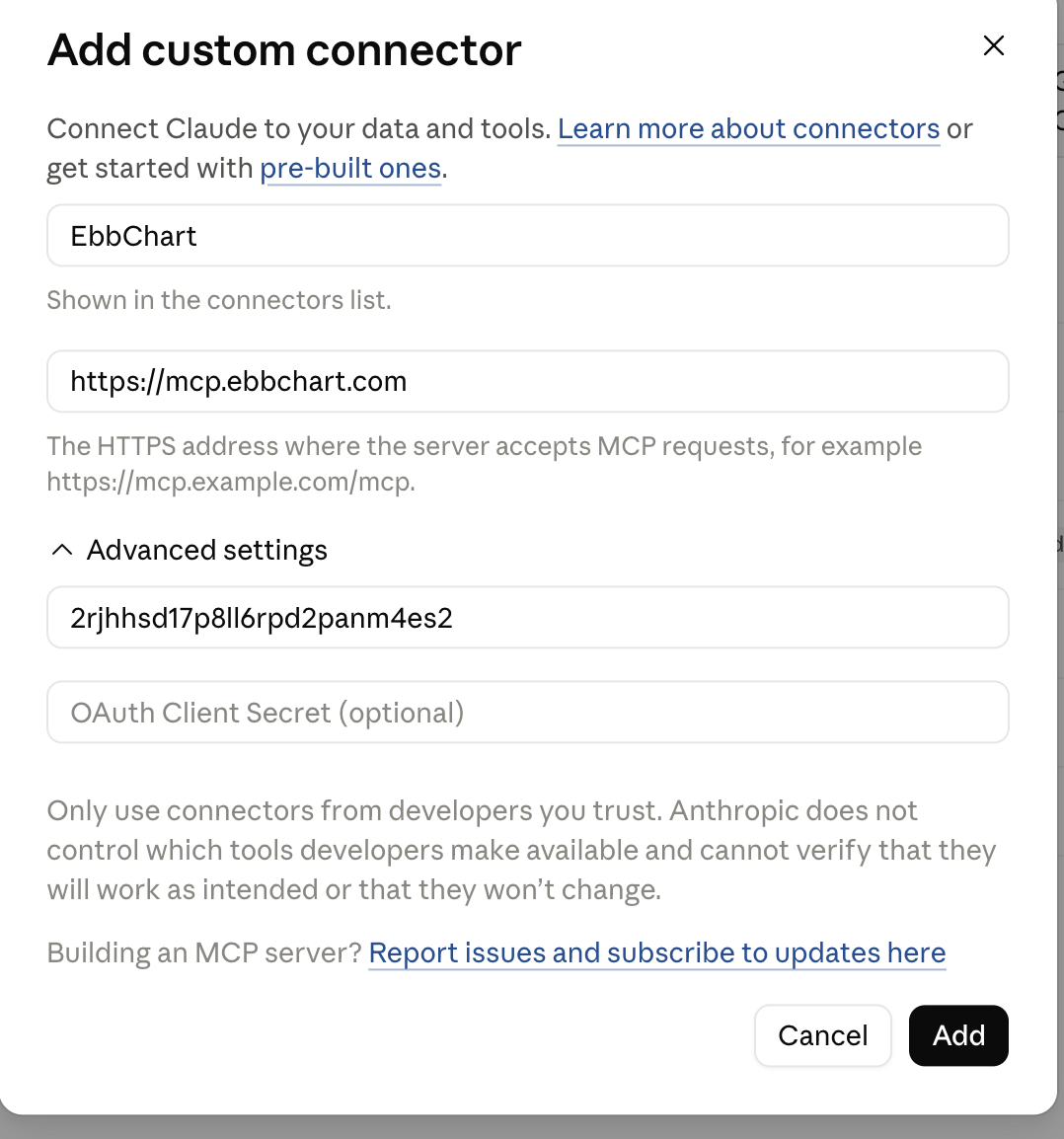
Enter the Server URL:
https://mcp.ebbchart.com -
Click Advanced settings to expand that section. The Client ID field appears underneath — enter
2rjhhsd17p8ll6rpd2panm4es2there. Leave OAuth Client Secret empty. - Click Add, then sign in with your EbbChart account when the login page opens.
Setting up in Claude Desktop
- Enable access in EbbChart first — same as step 1 above.
- Open Claude Desktop and go to Settings → Integrations → Add integration.
- Enter the same Server URL and Client ID as above.
- Sign in with your EbbChart account when the browser opens.
Supported clients
Claude Code is not supported. Claude Code uses RFC 8252 loopback redirects on ephemeral ports. Cognito matches callback URLs exactly and cannot do port-agnostic matching, so the OAuth flow cannot complete. Use Claude.ai, Desktop, Mobile, or Cowork instead.
How to know it worked
Once connected, try asking Claude:
If the connector is working, Claude will answer using your actual data rather than asking what EbbChart is.
Troubleshooting
Go to Profile → Connected AI assistants in EbbChart and turn it on. This has to be done before the connector can return any data.
Open the connector settings, click Advanced settings to expand that section, and enter the client ID: 2rjhhsd17p8ll6rpd2panm4es2. Without it, Claude can't authenticate.
Make sure you're signing in with the same email address you used to create your EbbChart account.
Available tools
All tools are read-only. The connector cannot create, modify, or delete any data in your EbbChart account.
Rate limits
100 tool calls per user per UTC calendar day. The limit resets at midnight UTC. This applies to all connected AI assistants combined.
Privacy
Data retrieved by a connected assistant is transmitted to that assistant's provider (Anthropic) and governed by their privacy policy. EbbChart does not have access to your conversations with the AI assistant. See ebbchart.com/privacy → Section 7 for the full disclosure.
You can revoke access at any time from Profile → Connected AI assistants in the EbbChart app.
Questions
Technical reference
All values for developers or directory submissions.
| Server URL | https://mcp.ebbchart.com |
| Transport | Streamable HTTP (MCP 2025-11-25) |
| Auth | OAuth 2.0 — Cognito RS256 access token |
| Scope | ebbchart/data.read |
| Client ID | 2rjhhsd17p8ll6rpd2panm4es2 |
| Auth server | https://cognito-idp.eu-west-1.amazonaws.com/eu-west-1_KFBkJeYrN |
| Discovery | https://mcp.ebbchart.com/.well-known/oauth-protected-resource |